 Prylo
What you need
An Apple silicon Mac (M1 or later), macOS 14 or later, and enough free disk space for your selected model. Intel Macs are not supported. An internet connection is needed to browse and download models.
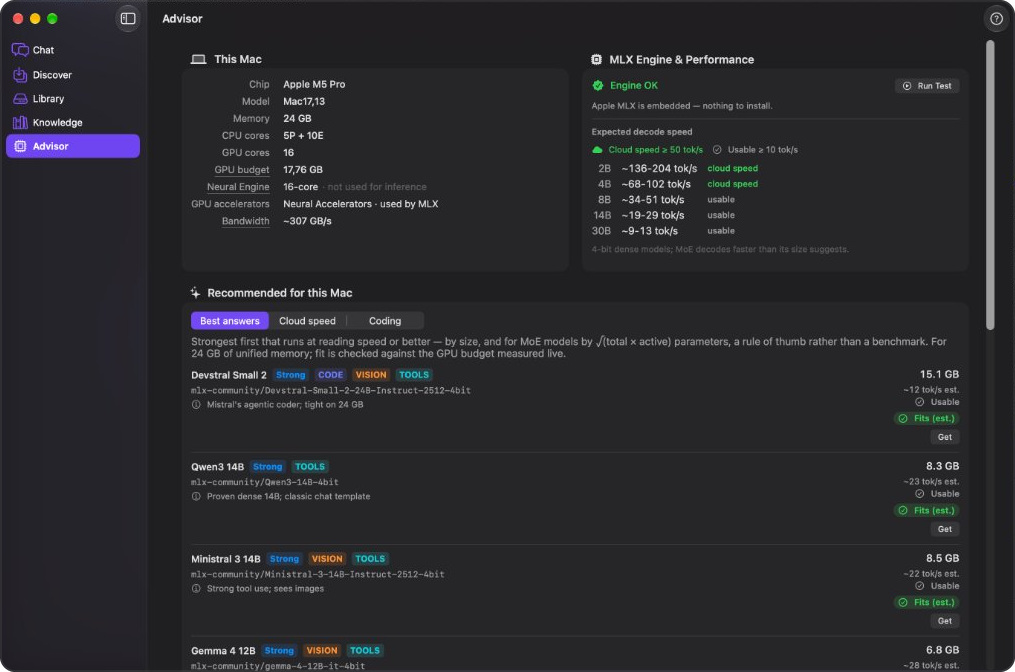
Model fit depends on weights, quantization, context length and your Mac’s available GPU memory. Rather than relying on a fixed “RAM equals model size” chart, Advisor reads the live Metal memory budget and estimates fit for your Mac.
Your first local model
- Open Advisor. Review your hardware and the recommended models. A recommendation is guidance; consider download size as well as capability.
- Choose a compatible model. Use Advisor or Discover to inspect its details. A smaller model is a lighter starting point. Check the fit badge before downloading.
- Download it. Track progress in Library. Gated Hugging Face repositories may require a read token and acceptance of the model’s licence.
- Open Chat. Select an installed model and send a message. The first reply includes model loading time.
What “offline” means
Local generation does not need a cloud inference service. After setup, you can turn off your connection and continue chatting with the model on disk.
Enable Fully Offline in Settings to remove network tools from the tools the model can use. Browsing hubs, downloading models and using external services require a connection. The switch controls the app’s network tools; it does not turn off your Mac’s networking.
If you enable web search, page fetch or remote MCP, requests go to the relevant provider and can include information from the conversation. See the privacy policy for the distinction between local inference and optional online tools.
Choose MLX, check the architecture
Prylo uses Apple MLX. Look for compatible MLX-format weights, commonly supplied as .safetensors files. GGUF files are not supported.
Discover searches Hugging Face and ModelScope, but not every repository on those hubs can run in the bundled runtime. Model architecture, vision support, tool calling and fine-tuning support all matter. Check the model details and its licence before downloading.
A few useful expectations
- Longer context uses more memory, even with the same weights.
- Speed estimates help you compare options; they are not measured benchmarks for every model.
- Small models can be useful for quick tasks, but tool use and reasoning depend on model capability.
- Local models can produce inaccurate answers. Review important output.
Make it your own.
Once local chat is working, explore your document knowledge base or the local API for coding tools.