 Prylo
A local knowledge base
Knowledge splits your documents into passages and computes an embedding for each passage. An embedding is a numerical representation used to find related text. When document search is available to a supported chat model, it can retrieve passages relevant to your question.
This workflow is often called retrieval-augmented generation, or RAG. Your files are searched to provide context; indexing does not retrain the chat model or permanently teach it the contents of your documents.
Choose where embeddings run
Prylo supports on-device embedding models, including an Apple Neural Engine option through macOS. That option separates indexing from the GPU used by your chat model. Other embedding models may require a download.
The Neural Engine option is for document embeddings. Chat generation runs through MLX on the GPU. Embedding choice affects retrieval quality; use the in-app retrieval check to compare results on your own documents.
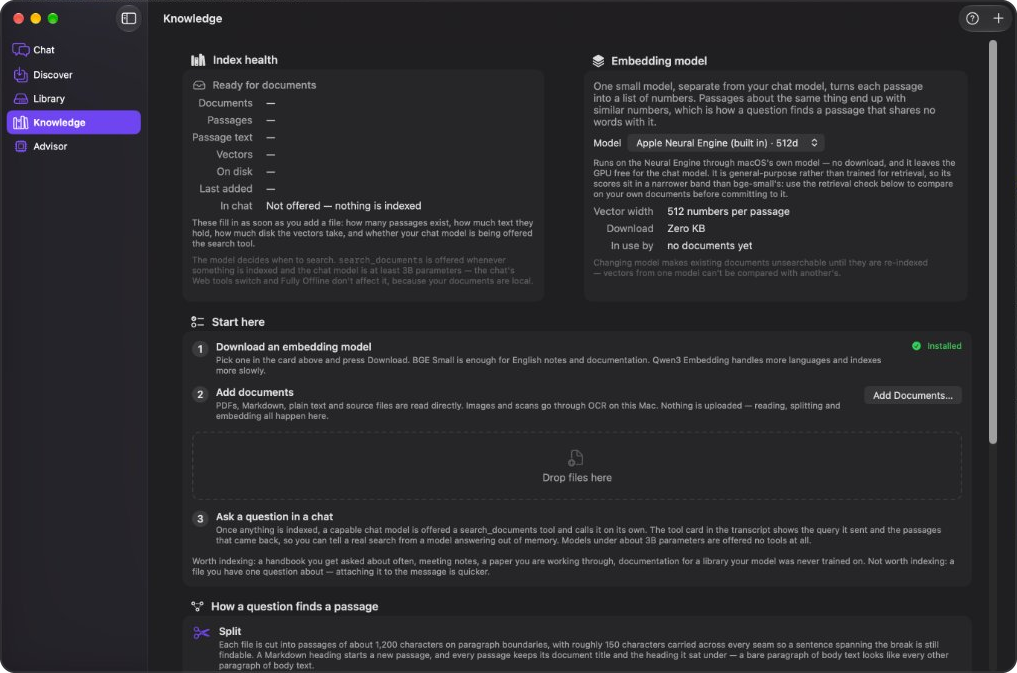
Start with a small collection
- Open Knowledge and choose the documents you want to index.
- Select an embedding model and let indexing complete.
- Use the retrieval check to try a question you already know your documents answer.
- Chat with a model that supports document search. Ask a specific question and inspect the retrieved material.
Try a bounded question such as “Which sections discuss the launch timeline?” or “Find the assumptions behind this proposal.” A focused question makes it easier to evaluate the retrieved passages.
Private processing, clear expectations
Indexing and retrieval happen locally. Document search can work offline after the required models are available. If you also enable online tools in a conversation, the model may include document information in requests to those tools. Use Fully Offline mode when you want the conversation to have no network tools.
Retrieval is selective, not a guarantee that every relevant sentence will be found. Results depend on text extraction, passage boundaries, embedding quality and the chat model. Check source passages and the original document before relying on an answer.
First, bring a model home.
The offline AI guide walks through hardware requirements, model fit and your first conversation.